| In January of 2018, two large Apple shareholders with a $2 billion stake wrote an open letter to Apple. They demanded the smartphone maker respond to a “growing public health crisis” of smartphone addiction in young people. Teens who spent more time on new media (screens) were more likely to report mental health issues than those who spent time on non-screen activities. A 2017 study found kids who spent three hours or more a day on smartphones or other electronic devices were 34% more likely to suffer at least one suicide-related outcome—including feeling hopeless or seriously considering suicide—than kids who used devices two hours a day or less. Among kids who used electronic devices five or more hours a day, 48% had at least one suicide-related outcome.1 Apple has responded by creating a new set of parental control functions known as “Screen Time.”
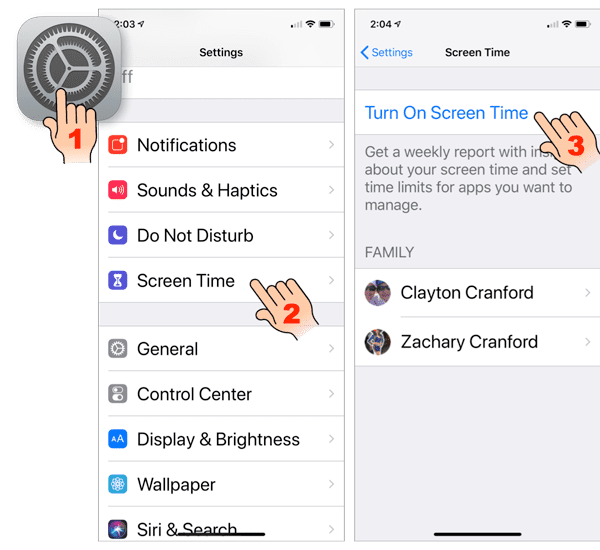
Screen Time works via Family Sharing, so as long as your children are part of your Family in the Family Sharing settings, you’ll be able to view and control their Screen Time options from your phone. If the child has an iPhone, and the parent has an Android phone, Screen Time settings can be set on the child’s device. Unfortunately, the parent will have to access the child’s phone to see screen time information or make changes to the settings. The best situation is for the parent and child to both have iPhones and connected with Family Sharing. Turn on Screen TimeYou will need to turn on and set up Screen Time on all the devices owned and used by your children. This is done in the Screen Time section of the Settings app. |